


Walgreens
4.6230.71K Reviews
App Specs
- Version
- 117.1
- Updated On
- License
- Free
- Downloads
- 10,000,000+
- Developer
- Walgreens Co
- Categories
- Shopping
- Platform
- Android, iOS
Screenshots
 Analysis by AppCompare
I find the Walgreens app most useful when I already know I’m going to a Walgreens and want to handle a pharmacy or shopping task before I get there. It brings several familiar errands into one place, but it works best as a companion to the chain rather than a general-purpose health or shopping app. If you rarely shop at Walgreens, much of its convenience naturally matters less.
Using the app for pharmacy and shopping errands
As a free shopping app from Walgreen Co., it combines prescription-related tasks with browsing and other store needs. Its 4.6 average from around 1.4 million ratings suggests that many people find the mix useful, though a high score cannot tell you whether it fits your particular routine. I would think of it as a practical shortcut for existing Walgreens customers, not a reason by itself to change pharmacies.
Where its all-in-one approach helps
The main appeal is having several Walgreens tasks together instead of switching between a pharmacy tool, a shopping app, and a separate way to look for store information. That can be especially handy when a refill and a household purchase are on the same to-do list. The trade-off is that the app’s value depends on using this retailer: if your prescriptions and regular shopping are elsewhere, a pharmacy-specific app or your usual store’s app may be more useful.
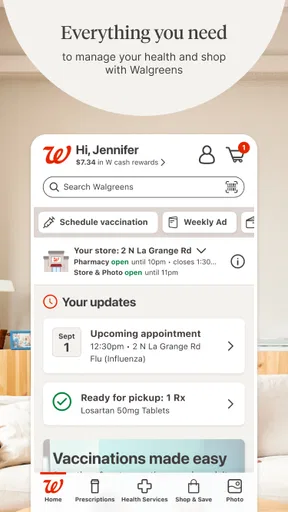
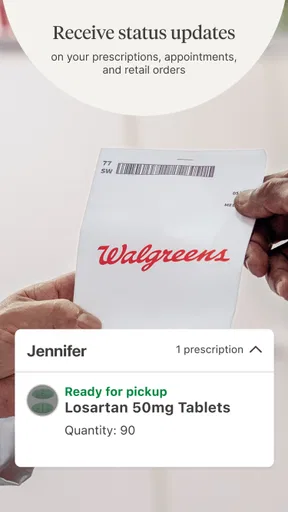
A realistic example is planning a pickup before work. I can check on a refill, look for an item I need, and use the store information to decide whether that location is convenient. I would still confirm the prescription is ready before making a special trip; seeing an order status is helpful, but it is sensible not to treat a planned pickup as completed until the app indicates it is ready. Combining errands can save time, while separating them can be wiser if the pharmacy task is urgent.
Useful habits for regular customers
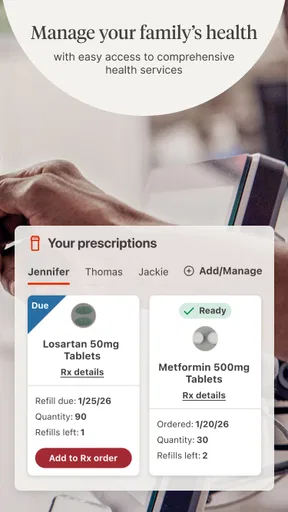
For recurring prescriptions, keeping the barcode or prescription details accessible can make a refill less of a chore than searching through paperwork each time. If you use a medication reminder, set it up around your actual schedule and check that the details remain right when your routine changes. Reminders are prompts, not a substitute for instructions from a clinician or pharmacist, and the app is not a place to make medication changes on your own.
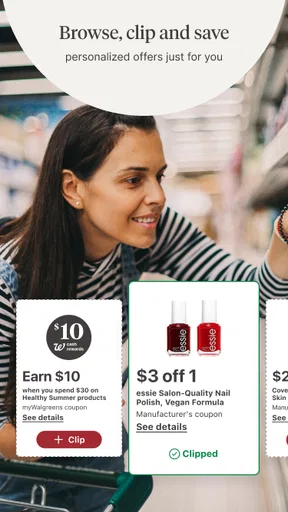
Deals and weekly ads are most useful when I start with a shopping list rather than letting a promotion decide what I buy. Checking offers before a planned store run can help me spot relevant savings; it is less helpful if I spend time chasing discounts on things I would not otherwise purchase. I would also look at the current terms in the app before counting on a deal, since an advertised offer and the final conditions at checkout are not the same thing.
Who will get the most from it
This is a strong fit for people who use Walgreens for prescriptions and also pick up everyday items there. It may be particularly convenient for someone coordinating routine errands for a household, because pharmacy and shopping tasks sit under one retailer account. The app is rated for Everyone, and it has more than 10 million installs, but those broad audience signals do not mean every feature suits every person or every health situation.
Worth Reading Before You Choose

EA SPORTS FC Mobile 26 Is a Bigger Football Game, but It Takes Time

Flipboard Shows What News Apps Must Do Beyond the Feed

Switching to Android Auto Means Rethinking Your Driving Routine

Google Calendar Makes a Crowded Week Easier to Manage

Ludo King Makes the Most of the Minutes Between Plans

Baby Panda World Brings Quick Play to Modern Phones, but Its Game Library Feels Busy
I would skip it if I do not use Walgreens, prefer to speak to pharmacy staff in person for every request, or want one neutral app to manage care across different providers and stores. For those needs, contacting the pharmacy directly or using the tools offered by the provider I already rely on may be simpler. The app is also not a replacement for urgent medical advice: a retail pharmacy interface is useful for routine logistics, not emergency care.
What to expect from the current version
The app first appeared on June 3, 2010, and its current version is 108.1. That long history and a current numbered release show that it has continued as a maintained product; they do not, by themselves, reveal which particular features changed between releases. For an existing user, the practical question is whether the version available on their device still supports the tasks they depend on. The minimum operating system is 10, so it is worth checking device compatibility before planning to rely on it.
On an established account, I would take a moment to verify the selected store and prescription details before submitting a refill. That small check can prevent a routine request from going to the wrong location or using outdated information. If something looks inconsistent, pausing to contact the pharmacy is better than repeatedly resubmitting the same request. The app is a convenient channel, but a clear confirmation and the pharmacy’s own guidance still matter.
Remaining limits and sensible expectations
The app’s range is useful, but a single interface cannot remove every step involved in a pharmacy transaction. A refill still depends on the prescription and pharmacy process, and shopping convenience depends on the store you choose. I would not assume that every item will be available at every location or that every task can be finished without staff help. Treat the app as a way to organize and start routine errands, with the store or pharmacy as the fallback when a detail needs clarification.
Compared with using a pharmacy counter and browsing in person, the app can reduce the amount of planning that happens at the store, especially for a straightforward refill or a quick purchase. Compared with a dedicated pharmacy service, its distinguishing advantage is the connection to Walgreens shopping; a pharmacy-only alternative may be preferable if I need a narrower, care-focused experience. Compared with a general retailer app, this one is more relevant when prescriptions are part of the same visit. Which option is better comes down to where I fill prescriptions and shop, not to a universal winner.
Seamless Navigation and User Interface
First off, let’s talk about the user interface. The Walgreens app greets you with a clean and straightforward layout. It’s like walking into a well-organized store, complete with clearly marked aisles. The main menu is easily accessible, and finding what you need is a breeze. Whether you’re looking to refill a prescription or browse their weekly ads, everything is just a tap away.
Prescription Refills Made Easy
One of my favorite features has to be the prescription refill option. You can scan your prescription barcode or enter it manually, and voilà, you're all set. It’s quick, painless, and saves you a trip to the store. Plus, the app lets you track your order status, so you know exactly when it’s ready for pickup. It’s like having a personal pharmacist in your pocket.
Rewards and Deals Galore
If you’re anything like me and love a good deal, you’ll appreciate the Balance Rewards program. The app keeps track of your points, and you can easily redeem them for discounts. The weekly ads section is another treasure trove of savings, updated regularly so you never miss out on a bargain. It's a great way to save some bucks while shopping for essentials.
Health and Wellness Features
Beyond shopping, the app offers several health and wellness features. You can set up medication reminders, which is a lifesaver if you’re juggling multiple prescriptions. There’s also a pharmacy chat option where you can ask a licensed pharmacist any questions or concerns. It feels like having a health concierge at your fingertips.
Store Locator and Curbside Pickup
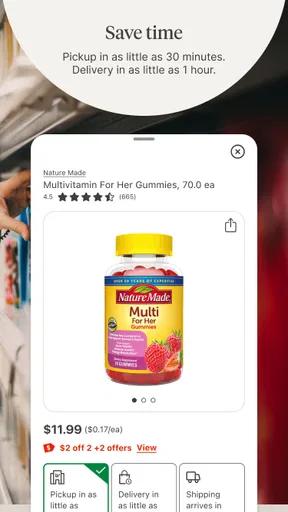
Need to find the nearest Walgreens? The store locator function is super handy. It gives you directions, store hours, and even lets you know if a specific item is in stock. Plus, with curbside pickup, you can shop online and pick up your order without stepping out of your car. It’s perfect for those days when you’re in a rush or just want to avoid the crowds.
Overall, the Walgreens app is a game-changer for anyone who frequents this popular pharmacy chain. It’s user-friendly, packed with features, and makes managing prescriptions and shopping a whole lot easier. Whether you’re tech-savvy or not, this app is designed to make your life simpler and more convenient. So, go ahead, download it and see for yourself!
Pros
- User-friendly interface
- easy to navigate.
- Quick prescription refills and reminders.
- Integration with Balance Rewards program.
- In-app photo printing services.
- Access to weekly promotions and discounts.
Cons
- Occasional app crashes reported by users.
- Limited features outside the US.
- Some users find account setup tedious.
- Inconsistent coupon application in-store.
- Push notifications can be overwhelming.
FAQs for Walgreens
What services does the Walgreens app offer?
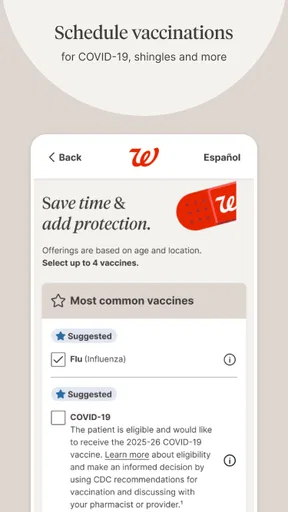
The Walgreens app provides a comprehensive range of services including prescription refills, photo printing, and access to the weekly ad for shopping deals. Users can also manage their rewards through the app, locate nearby stores, and schedule online consultations with pharmacists, making it a one-stop solution for health and wellness needs.
How does the prescription refill feature work on the Walgreens app?
The Walgreens app allows users to easily refill prescriptions by scanning the barcode on their medication bottle or manually entering the prescription information. Users receive notifications when it's time to refill, and they can choose to have their prescriptions delivered to their home or available for pickup at their local Walgreens store.
Is the Walgreens app secure for managing personal health information?
Yes, the Walgreens app is designed with robust security measures to protect users' personal and health information. It employs encryption and secure login methods to ensure that sensitive data is kept confidential. Users can also enable additional security features like fingerprint or face recognition for added protection.
Can I use the Walgreens app to print photos?
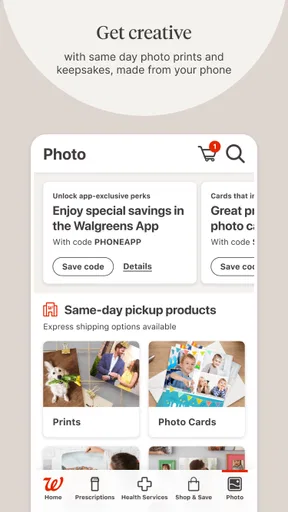
Absolutely! The Walgreens app offers a convenient photo printing service. Users can upload photos directly from their phone, select the print size, and choose to pick them up at a nearby store or have them delivered. The app also provides options for creating custom photo gifts and prints, enhancing the user experience.
Does the Walgreens app offer any loyalty rewards or discounts?
Yes, the Walgreens app integrates the myWalgreens rewards program, allowing users to earn points on purchases which can be redeemed for discounts. The app also provides exclusive deals and offers, enabling users to save money on their purchases. Notifications about sales and promotions keep users informed about the latest savings opportunities.


